Note: Baby monitors are a convenience and safety tool, not a medical device. No baby monitor replaces safe sleep practices (firm flat surface, on the back, no soft bedding). Parents should always follow the AAP safe sleep guidelines. Vital sign monitors marketed for consumer use have not been demonstrated to reduce SIDS risk.
Bringing a newborn home changes everything — including how you sleep. A reliable baby monitor lets parents and caregivers rest, work, or tend to other responsibilities while staying connected to baby. The baby monitor market has expanded dramatically beyond simple audio devices to include HD video cameras, two-way audio, smartphone apps, room temperature sensors, and wearable vital sign trackers. This guide helps you cut through the options to find what actually matters. Find baby care essentials at AllCare Store's mom & baby collection.
Types of Baby Monitors
Audio-Only Monitors
The simplest and least expensive option, audio monitors transmit sound from the nursery to a handheld parent unit. They have no camera, no screen, and no app — just sound. Modern audio monitors offer good range (up to 1,000 feet for quality units), rechargeable parent units, vibration alerts for hearing-impaired parents, and DECT technology that reduces interference and encrypts the signal. Audio monitors are a solid choice for parents who do not need video, who want a simple device with no learning curve, or who are monitoring older babies in a small home where the parent unit stays within a room or two of the nursery.
Video Monitors (Dedicated Units)
Video monitors include a nursery camera unit and a parent unit with a screen — typically a 3.5 to 5-inch LCD display. No smartphone or internet connection is required; the camera and parent unit communicate directly by radio frequency. This direct connection is a significant advantage: it works if your home Wi-Fi goes down, does not stream footage to a server, and typically has lower latency than app-based monitors. Most video monitors offer night vision, two-way audio (so you can speak to or soothe baby without entering the room), pan/tilt/zoom camera control, room temperature display, and lullaby playback. Battery life on the parent unit typically runs 8–12 hours before charging.
Dedicated video monitors are the most popular choice for families who want video without app complexity, are concerned about internet security and privacy, or have spotty home Wi-Fi. They are more expensive than audio-only monitors but are not dependent on any subscription or cloud service.
Wi-Fi Smart Monitors (App-Based)
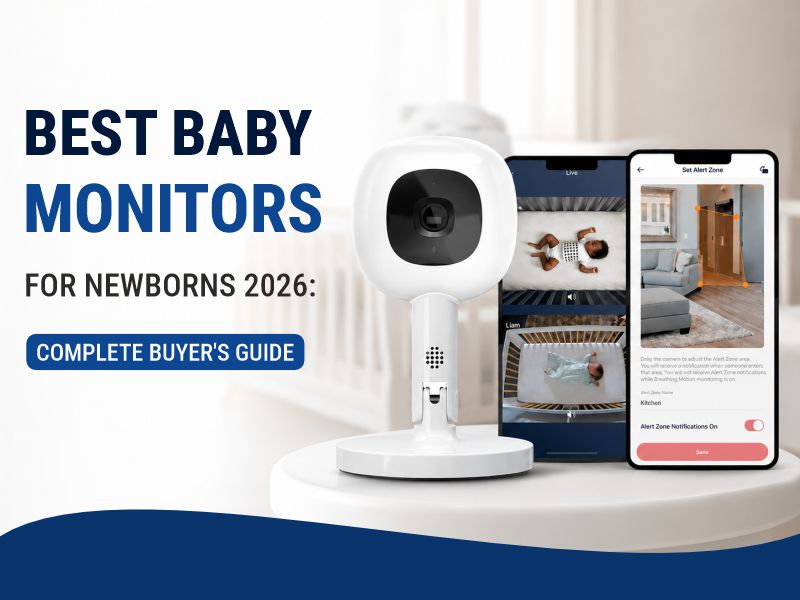
Smart monitors connect the nursery camera to your home Wi-Fi network and stream video to a smartphone app rather than a dedicated parent unit. This means you can check on baby from anywhere with an internet connection — from the grocery store, a neighboring room, or another city when traveling. Smart monitors typically offer 1080p or higher resolution, cloud video storage (often subscription-based), person and motion detection, two-way audio, and integration with smart home platforms like Google Home or Amazon Alexa.
The trade-offs: smart monitors depend on reliable home Wi-Fi and internet service, have latency (a brief delay between camera and phone), may require a monthly subscription for cloud video storage, and raise privacy considerations since footage may be processed on manufacturer servers. Security varies by brand — look for end-to-end encryption and two-factor authentication. Smart monitors are the best choice for parents who travel frequently, want to check on baby from anywhere, or already use smart home devices and want seamless integration.
Wearable Baby Monitors
Wearable monitors, like the Owlet Smart Sock or Nanit breathing wear, attach to baby to track movement, heart rate, and/or oxygen saturation while sleeping. They alert parents to unusual readings — extended periods of no movement, or in the case of the Owlet, oxygen levels outside normal range. These devices are marketed to anxious parents who want an extra layer of reassurance beyond a camera and audio monitor.
Important context: the FDA has not cleared consumer baby wearables as medical devices for apnea monitoring or SIDS prevention. The American Academy of Pediatrics does not recommend these products as substitutes for safe sleep practices, and the SIDS evidence base does not support claims that any monitor reduces SIDS risk. For medically complex infants with documented apnea or cardiorespiratory conditions, physicians prescribe certified medical-grade apnea monitors that are a different category entirely. Wearable consumer monitors provide reassurance and will alert parents to concerning changes — but they are not medical devices and should not replace or delay seeking emergency care.
Key Features to Consider
Video Quality and Night Vision
Most video monitors display 720p on the parent unit screen (which is adequate given the small screen size), while app-based smart monitors often offer 1080p or higher viewed on a full smartphone screen. Night vision is available on virtually all video monitors — look for infrared LED night vision that provides a clear black-and-white image in a completely dark room. Some monitors offer color night vision using dim room light amplification, which produces warmer images but is less effective in total darkness.
Range
Advertised range figures ("1,000 feet") are measured in open air with no walls or interference. Actual range through walls and floors is much shorter. A typical two-story home may only reliably work within 150–300 feet of wall-penetrating range. Check reviews for real-world range performance. For larger homes or homes with thick concrete or masonry walls, look for monitors that specifically list multi-floor or large home performance, or consider a Wi-Fi smart monitor that uses your home network infrastructure.
Two-Way Audio
Two-way audio (a microphone in the parent unit so you can speak through the nursery camera's speaker) lets you soothe baby with your voice, alert an older sibling in the room, or communicate without walking to the nursery. Most video and smart monitors include this feature; audio-only monitors sometimes do not. The quality varies — some monitors have a push-to-talk button that sounds robotic; better units provide clearer, more natural voice transmission.
Room Temperature Display
A built-in temperature sensor in the nursery camera lets you monitor the room temperature from the parent unit. The AAP recommends keeping the infant sleep environment between 68–72°F (20–22°C). A monitor that alerts you when the room is too warm or too cool removes guesswork. This feature is standard on most video monitors and smart monitors.
Battery Life (Parent Unit)
For dedicated video monitors, the parent unit battery life determines how long you can use it untethered from a power outlet. Short battery life (under 6 hours) means the parent unit needs to stay plugged in most of the time, limiting portability around the house. Look for 8–12+ hours of battery life at minimum, with the screen off in VOX (voice activation) mode extending battery significantly. VOX mode dims the screen when the room is quiet and activates the display only when sound is detected.
Multiple Camera Support
If you have multiple children in separate rooms, twins in a shared room, or want to monitor different areas, look for monitors that support multiple cameras on a single parent unit with split-screen or camera-switching capability. Most major monitor systems allow 2–4 cameras to be paired with one parent unit; additional cameras are usually sold separately.
Encryption and Privacy
For Wi-Fi smart monitors, privacy and security are legitimate concerns. Cameras connected to the internet have been hacked in high-profile incidents. Look for monitors that offer end-to-end encryption (footage is encrypted from camera to viewing device and cannot be read even by the manufacturer), two-factor authentication, automatic security updates, and a clear privacy policy about how data is stored and used. Avoid lesser-known brands with unclear data practices, especially if their manufacturing origin is ambiguous.
Budget Ranges
Under $50 — Audio monitors and basic video monitors. Adequate for small homes and parents who primarily want sound. Limited video quality, shorter range, minimal features.
$50–$150 — Mid-range dedicated video monitors. Good video quality, reliable range, temperature monitoring, two-way audio, VOX activation. The sweet spot for most families who want video without app complexity.
$150–$300 — Premium dedicated video monitors and entry-level smart monitors. Better video resolution, longer range, pan/tilt/zoom, larger parent unit screens, multiple camera support. Smart monitors at this range offer app streaming and full HD video.
$300+ — Premium smart monitors and wearables. High-resolution video, AI-powered features (sleep tracking, room condition logs, movement analysis), cloud storage subscriptions, premium wearable vital sign tracking.
Setting Up Your Baby Monitor
Position the nursery camera at a height that shows the entire crib — typically 3 to 5 feet above the crib mattress, angled downward. The camera should be far enough from the crib that the cord (if any) cannot be reached by baby — keep all cords at least 3 feet from the crib. Mount the camera to a wall or ceiling if the stand places it within reach. Cords are a strangulation hazard; secure all monitor cords out of reach.
For Wi-Fi monitors, position the router or a Wi-Fi extender to ensure a strong signal in the nursery — weak Wi-Fi causes dropped connections and video lag. After setup, test the two-way audio, night vision, and any motion or sound alerts before relying on the monitor overnight.
Additional Baby Safety Products at AllCare Store
AllCare Store carries a range of mom and baby care products, from feeding supplies and nursery essentials to postpartum recovery and newborn care items. All orders ship free. Call us at 1-888-889-6260 with questions about baby care products or to get recommendations based on your needs.
Mom & Baby Products | Baby Care Essentials | AllCare Store
Frequently Asked Questions: Baby Monitors
Do I really need a video baby monitor, or is audio enough?
An audio monitor is technically sufficient — it lets you hear if baby cries and wakes you if something is wrong. A video monitor adds the ability to check on baby visually before going into the room (which avoids unnecessary wake-ups), see whether a crying episode resolves on its own (some babies are noisy sleepers), and confirm baby's position in the crib. Whether video is worth the additional cost depends on how anxious you are, the size of your home, and how often you want to check on baby without entering the room. Many parents find the video feature significantly reduces sleep anxiety and allows them to respond more calmly — but it is not a necessity.
Are Wi-Fi baby monitors safe from hackers?
The risk of a baby monitor being hacked is real but largely preventable with proper security practices. Use a monitor from a reputable brand that offers end-to-end encryption and two-factor authentication. Keep the monitor's firmware updated — most security vulnerabilities in consumer cameras are addressed through software updates. Secure your home Wi-Fi with a strong, unique password and WPA3 encryption if your router supports it. Never use the default username and password from the manufacturer. If you prefer to avoid internet-connected cameras entirely, a dedicated non-Wi-Fi video monitor eliminates the remote access risk entirely, at the cost of not being able to view the camera outside your home network.
Can I use a baby monitor to detect SIDS?
No consumer baby monitor — including wearable monitors that track movement, heart rate, or oxygen levels — has been shown in clinical studies to prevent SIDS (Sudden Infant Death Syndrome). The American Academy of Pediatrics explicitly states that these devices are not recommended for SIDS prevention, and the FDA has not cleared any consumer wearable monitor as a SIDS prevention device. The most effective evidence-based SIDS prevention measures are: placing baby on their back to sleep on a firm, flat surface with no soft bedding, pillows, or positioners; room-sharing without bed-sharing; breastfeeding; avoiding smoke exposure; and keeping the room at a comfortable temperature. Wearable monitors may provide reassurance and will alert you to concerning changes, but they do not reduce SIDS risk.
How far should the baby monitor camera be from the crib?
The camera should be positioned at least 3 feet away from the crib — both to get a useful viewing angle of the whole crib and critically to keep cords out of baby's reach. Camera cords and cables are a strangulation hazard; mount the camera to a wall or ceiling bracket rather than placing it on a surface where baby could eventually reach it. Ideal placement is 3–5 feet above the crib level, angled downward to show the entire sleep surface. If using a battery-powered or cordless camera, cord distance is less of a concern, but keep the camera secure enough that it cannot be knocked into the crib.