Medical Disclaimer: This article is for informational purposes only and does not replace medical advice. Alert thresholds, treatment steps for high or low glucose, and monitoring plans should always be set with your parent's healthcare team. If you believe someone is experiencing a medical emergency, call 911.
Watching Over a Parent's Glucose — From Anywhere
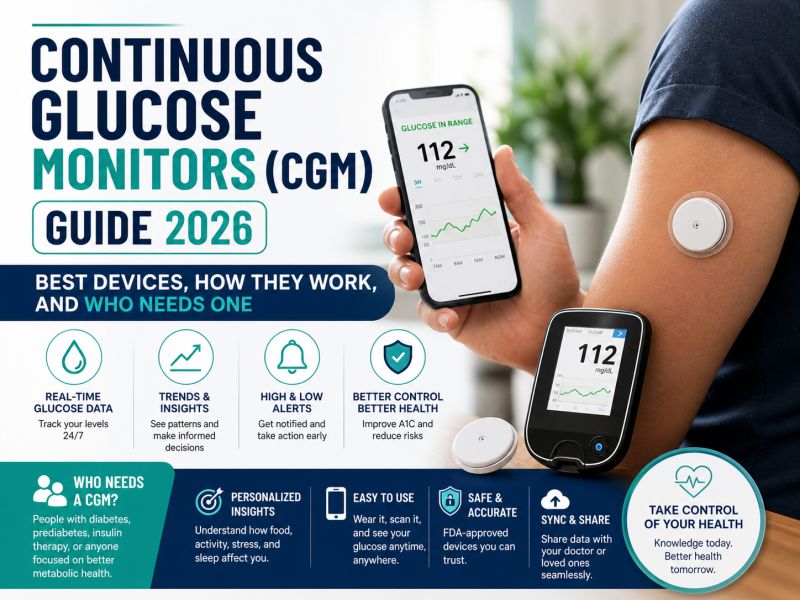
One of the hardest parts of helping an aging parent manage diabetes is the not knowing. Did Dad's blood sugar drop overnight? Is Mom running high because she forgot her medication again? For decades, the only way for family to know was to ask — or to be in the room. Continuous glucose monitors (CGMs) changed that. Modern systems such as the Dexcom G7 and FreeStyle Libre 3 can share glucose readings with family members' phones in near real time through free companion apps: Dexcom Follow and LibreLinkUp.
Set up thoughtfully, remote monitoring lets your parent keep their independence while you keep a quiet safety net running in the background. Set up carelessly, it produces 2 a.m. false alarms, family friction, and a parent who feels surveilled. This guide walks through the setup, the alert strategy, and the conversations that make remote CGM monitoring work for everyone involved.
If your family is still choosing a device, start with our Continuous Glucose Monitors guide, which explains how sensors work and compares the major systems. This article assumes a CGM is already on your parent's arm and focuses on what the caregiver does next.
How Remote CGM Monitoring Actually Works
It helps to understand the chain of events behind every shared reading. The sensor on your parent's arm measures glucose in the fluid under the skin and sends the value by Bluetooth to the CGM app on their phone. That app uploads readings to the manufacturer's secure cloud service over Wi-Fi or cellular data. The cloud then pushes the numbers to the follower app on your phone, wherever you are. Two practical consequences follow from this design:
- Your parent's phone must be near them and online. If their phone is left charging in another room, or their internet goes out, your feed pauses — even though their own on-phone readings and alerts usually continue.
- Remote monitoring is a backup, not a replacement. Your parent's own app remains the primary alert system. Your role is to be a second set of eyes, especially overnight and during illness.
Setting Up Dexcom Follow (Dexcom G7)
On your parent's phone
- Open the Dexcom G7 app and find the Share feature in the app's connections menu.
- Create an invitation with your name and email address and send it. Your parent stays in control: they choose who follows and can stop sharing at any time.
On your phone
- Install the free Dexcom Follow app.
- Open the invitation email, accept it, and sign in.
- Your parent's current glucose, trend arrow, and recent history graph appear, and you can configure your own notification settings independently of theirs.
Dexcom's sharing supports multiple followers, and each follower sets their own alerts — so a daughter across town and a son across the country can each decide what is worth being woken up for.
Setting Up LibreLinkUp (FreeStyle Libre 3)
- On your parent's phone, open the FreeStyle Libre 3 app menu and choose Connected Apps, then LibreLinkUp.
- Add your name and email address to send an invitation.
- On your phone, install the free LibreLinkUp app, create an account with the same email address the invitation was sent to, and accept it.
You will now see your parent's readings and can enable notifications for lows, urgent lows, and highs. As with Dexcom, several family members can follow at once, and your parent can remove any follower whenever they choose.
Alert Settings That Won't Burn You Out
The most common mistake new caregiver-followers make is switching every alert on at full volume. Within a week the phone buzzes so often that alerts stop meaning anything — clinicians call this alarm fatigue, and it is the fastest way to make remote monitoring fail. A sustainable strategy looks like this:
- Keep the urgent low alert on, always. A severely low glucose is the scenario where minutes matter and where an older adult may be too confused to act alone. Set this alert to sound even when your phone is silenced, if your phone allows critical alerts.
- Add a delay to routine alerts. Follower apps let you require that a reading stay low or high for a set period before you are notified. A brief dip that self-corrects doesn't need to interrupt your workday.
- Be selective about high alerts. Highs are rarely minute-by-minute emergencies. Many caregivers only alert on highs that persist for an hour or more, and review the rest as patterns at the end of the week.
- Decide deliberately about signal-loss alerts overnight. Brief data gaps are common and usually harmless. If a no-data alert will wake you at 3 a.m. every time a parent rolls onto their phone-side, consider leaving it for daytime only — unless hypoglycemia unawareness makes gaps genuinely risky.
- Review after two weeks. Count how many alerts you received and how many required action. If most were noise, widen thresholds or add delays. The goal is that when your phone sounds, you move.
When an Alert Fires: A Simple Caregiver Playbook
| Alert | What it may mean | Sensible first response |
|---|---|---|
| Urgent low | Glucose critically low; confusion or unconsciousness possible | Call your parent immediately; start the escalation plan if no answer |
| Low | Trending low; often before a meal or after activity | Watch the trend arrow; call if it keeps falling or your parent is alone |
| High (prolonged) | Missed medication, illness, or food choices | Check in without judgment; follow the written care plan |
| No data | Phone out of range, app closed, internet down, sensor warm-up | Usually just a call: 'Is your phone with you?' |
Responding to lows
Call your parent first. If they answer and can act, guide them through what their care team has prescribed — commonly the 15-15 approach: about 15 grams of fast-acting carbohydrate (juice, regular soda, or glucose tablets), then a recheck in 15 minutes, repeating if still low. Stay on the phone if they sound shaky or confused. If they don't answer, work a pre-agreed escalation ladder: a text, a second call, a trusted neighbor or nearby relative with a key, and finally emergency services. Ask the care team whether your parent should keep rescue glucagon (nasal or injectable) at home and make sure anyone likely to be present knows where it is and how to use it.
Responding to highs
High readings are usually a conversation, not a crisis. Persistent highs accompanied by symptoms — unusual thirst, nausea or vomiting, deep rapid breathing, confusion — warrant a same-day call to the clinician or urgent care, particularly for insulin users, who may also be asked to check ketones. Otherwise, follow the written plan: fluids, medication timing, and a note to discuss the pattern at the next appointment.
Whatever the details, put the plan in writing with your parent and their clinician — who calls whom, at what numbers, in what order. A plan that exists only in your head will fail at 3 a.m.
Sharing Data With the Care Team
Both ecosystems include clinic-facing platforms — Dexcom Clarity for Dexcom users and LibreView for Libre users — where the medical team can review weeks of data at a time: time in range, overnight patterns, and glucose variability. At the next appointment, ask the clinic to connect to your parent's account so reports flow automatically. As a caregiver, your most valuable contribution is context the graph can't show: a skipped lunch, a new medication, a stomach bug, a change in sleep. Bring patterns and notes, not a list of individual numbers.
The Consent Conversation Comes First
Remote monitoring only works when your parent genuinely agrees to it. Raise it as a way to preserve independence rather than to police behavior: the safety net that makes living alone possible is an easier sell than a surveillance feed. Agree on ground rules before you connect — no commentary on every reading, which family members receive alerts, and when a phone call is warranted. Remind your parent that sharing is theirs to switch off at any time; paradoxically, knowing they hold the off switch makes most people comfortable leaving it on. Revisit the arrangement every few months. If your parent has cognitive impairment, involve whoever holds healthcare power of attorney, keep their own app as simple as possible, and let the follower apps carry more of the alerting load.
Troubleshooting Gaps in Your Feed
- Phone too far from the sensor. Bluetooth reach between sensor and phone is roughly room-scale — about 20 feet without obstructions. The single most effective fix is a habit: the phone travels with the person, including to the bathroom and the garden.
- App closed or battery-restricted. Phone battery savers can silently shut background apps. Exempt the CGM app from battery optimization, and reopen it after every phone restart or update.
- Internet outage at the house. Your parent still sees readings; you don't. A follower gap with a reachable, feeling-fine parent is an internet problem, not a glucose problem.
- Sensor warm-up. Every new sensor has a warm-up window with no readings. Expect a predictable gap on sensor-change day.
- Compression lows. Sleeping directly on the sensor can produce brief false low readings overnight. A pattern of short, sharp overnight dips that recover on their own — always on the sensor side — is worth mentioning to the care team before changing any medication.
- Repeated signal loss or sensor errors. Both manufacturers replace faulty sensors through their support lines; keep the lot number handy.
A Note on Over-the-Counter CGMs
In 2024 the FDA cleared the first over-the-counter glucose biosensors — Dexcom Stelo and Abbott Lingo — designed for adults not on insulin. The prescription systems (Dexcom G7, FreeStyle Libre 3) remain the standard for people who use insulin, and they are the systems with mature caregiver-sharing apps. OTC products have historically offered more limited sharing features, so if you are considering one for a parent, verify current app capabilities before relying on it as a remote-monitoring tool.
Diabetes Supplies, Delivered
From glucose tablets to daily testing and skin-prep supplies, you can keep your parent's cabinet stocked from our Diabetes Care collection — with free shipping on every order. Questions? Call 1-888-889-6260.
Frequently Asked Questions
Can several family members follow at the same time?
Yes. Both Dexcom Follow and LibreLinkUp support multiple followers, and each follower configures alerts independently. Many families designate one primary responder who keeps urgent alerts on at night, while others follow with quieter settings — this prevents both alarm fatigue and the assumption that 'someone else will call.'
Does my parent need a smartphone for me to follow them?
Generally yes. Sharing runs through the CGM app on your parent's phone plus an internet connection. A standalone receiver or reader device does not upload readings for remote followers in real time. If your parent uses a basic phone, some families set up a simple smartphone that lives in a pocket and exists mainly to run the CGM app.